Building a schema compliance tool for enterprise GIS
Most people experience GIS through the visible parts: a web map, a dashboard, a printed map, a layer in ArcGIS Pro. That is the part that looks finished. But an enterprise GIS system depends on work that happens earlier, before data is published, shared, or added to the system of record.
In a hub-and-spoke enterprise GIS model, departments often have their own GIS analysts who understand their programs, assets, and daily workflows. A central Enterprise GIS team manages the shared environment those datasets eventually move into. In that role, the team acts less like the owner of every dataset and more like a steward of the larger system. It makes sure data entering the enterprise environment can be understood, maintained, queried, published, and used by people beyond the department that created it.
That is where schema matters.
A feature class can look fine on the surface. It opens in ArcGIS Pro. The geometry displays. The attribute table has records. But enterprise GIS asks a different set of questions: Are the required fields present? Are they named correctly? Are the data types right? Are field lengths, aliases, domains, and null settings consistent with the standard? Can the dataset fit into the shared system without creating problems for the next analyst, editor, map, script, or application that depends on it?
The standard in this case was LGIM, the Local Government Information Model. LGIM provides a common structure for local government GIS data, including expected feature class names, fields, data types, aliases, domains, and other schema elements. It does not erase local needs, and it does not make every dataset identical. But it gives a local government a shared starting point for organizing information that has to move across departments, systems, and uses.
One useful part of the tool was that the standard had been translated into values Python could actually check. The script stored expected field properties in dictionaries: data type, length, alias, and null settings. That turned the written standard into something testable.
enterprise_field_checks = [
    {
        "FACILITYID": "String",
        "INTID": "Integer",
        "LASTUPDATE": "Date",
        "LASTEDITOR": "String",
        "NOTES": "String",
        "ENTERPRISEID": "String",
        "CREATOR": "String",
        "CREATIONDATE": "Date"
    },
    {
        "FACILITYID": 20,
        "LASTEDITOR": 50,
        "NOTES": 255,
        "ENTERPRISEID": 20,
        "CREATOR": 50
    },
    {
        "FACILITYID": "Facility Identifier",
        "INTID": "Integer ID",
        "LASTUPDATE": "Last Update Date",
        "LASTEDITOR": "Last Editor",
        "NOTES": "Notes",
        "ENTERPRISEID": "Enterprise ID",
        "CREATOR": "Creator",
        "CREATIONDATE": "Creation Date"
    },
    {
        "FACILITYID": True,
        "INTID": True,
        "ENTERPRISEID": True
    }
]
This matters because schema compliance is not just about whether a field exists. A field can be present and still be wrong if it is stored as the wrong type, has the wrong length, uses an unexpected alias, or allows null values where the enterprise model requires a value.
The tool also recognized a practical distinction between data created and maintained in-house and secondary data from outside sources, such as federal, state, regional, or county datasets. Those two kinds of data do not always need the same schema. Internally maintained enterprise data may need fields for identifiers, editors, update dates, notes, and other tracking information. Outside data may need a lighter structure that preserves the source while still making the dataset usable inside the local system.
enterprise_data_field_names = set([
    "FACILITYID",
    "INTID",
    "LASTUPDATE",
    "LASTEDITOR",
    "NOTES",
    "ENTERPRISEID",
    "CREATOR",
    "CREATIONDATE"
])

outside_data_field_names = set([
    "FACILITYID",
    "AGENCY",
    "LASTUPDATE",
    "NOTES"
])
A written SOP can explain these requirements. It can tell analysts how to prepare an LGIM-compliant dataset before submitting it to the Enterprise GIS team. But documentation alone does not catch every issue. Submissions can still arrive with missing fields, wrong data types, mismatched aliases, incorrect field lengths, missing domains, or coded values that do not line up with the model. The dataset may be close, but close is not always enough to load it cleanly.
That creates a slow review cycle. Someone has to open the feature class, inspect the schema, compare it against the requirements, document the issues, and follow up with the analyst. When the same problems show up repeatedly, the work becomes less like review and more like repetition.
The custom tool changed that workflow.
Built for ArcGIS Pro users, the tool allowed an analyst to run a schema check before submitting a feature class. Behind the scenes, Python used ArcPy to inspect the dataset field by field and compare its actual structure against the expected LGIM requirements.
The tool also ignored ArcGIS-managed system fields, keeping the review focused on the business fields an analyst is responsible for structuring.
system_fields_to_ignore = [
    "OBJECTID",
    "SHAPE",
    "GLOBALID",
    "SHAPE_LENGTH",
    "SHAPE_AREA"
]
That small choice keeps the report from becoming cluttered. OBJECTID, SHAPE, GLOBALID, SHAPE_LENGTH, and SHAPE_AREA matter to the feature class, but they are not the same as the fields that carry local government information. The review needed to focus on the fields that determine whether the dataset follows the information model.
For each field, the script read the actual properties from the feature class and compared them against the expected values. If the field matched the standard, the check passed. If it did not, the script captured both what it found and what it expected.
field_datatype = field.type

if expected_datatype_val != "":
    if field_datatype == expected_datatype_val:
        checks_output_dict["expected_datatype"] = ok_msg
    else:
        checks_output_dict["expected_datatype"] = not_ok_msg
        if field.name.upper() in enterprise_data_field_names:
            diagnostics_message_dict["field_name"] = field.name
            diagnostics_message_dict["found_datatype"] = field_datatype
            diagnostics_message_dict["expected_datatype"] = expected_datatype_val
The problem is not always visible at first glance. A date field, text field, and integer field may all look like ordinary columns in an attribute table, but they behave differently in queries, joins, calculations, editing workflows, web maps, and reports. If a field is stored as the wrong type, the issue may not surface until someone tries to use the data downstream.
The tool also checked aliases. Field aliases are easy to dismiss as cosmetic, but they shape how people read and use a dataset. A database field name like LASTUPDATE may be fine for storage. An alias like Last Update Date is easier for editors, analysts, and application users to understand.
def do_alias_check(alias):
    alias_check_dict = {}
    alias_check_dict["alias_value"] = alias
    alias_check_dict["notes"] = []

    if alias:
        alias_check_dict["alias_present"] = alias_found
        alias_components = alias.split(" ")
        alias_test = True
The alias check looked for basic readability and formatting. It also gave the report something useful to say when the alias did not meet the expected pattern.
alias_check_dict["notes"].append(
    "Please ensure that the starting character of each word in field name alias is capitalized and "
    "rest of the word is lower case"
)
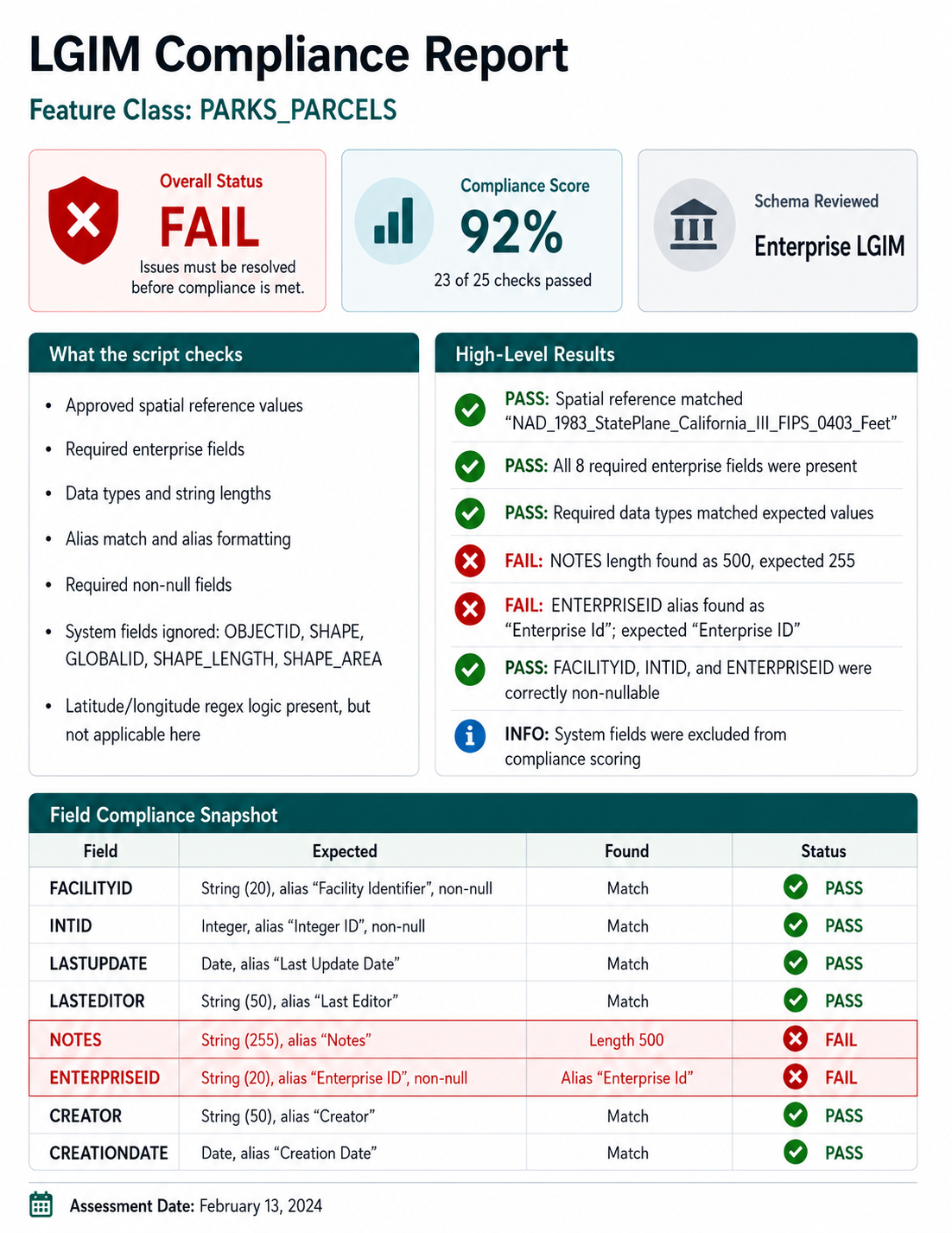
The output was a custom HTML report. It identified the feature class, stated whether it met LGIM standards, and listed the specific checks that failed. A useful report cannot simply say “failed.” It has to show what needs attention. If FACILITYID is missing, the report should name it. If a field is stored as the wrong type, it should show what was found and what was expected. If an alias does not match the standard, the analyst should be able to see the mismatch without digging through the schema by hand.
That is why the script kept both check results and diagnostic details.
checks_output_dict = {}
diagnostics_message_dict = {}

checks_output_dict["field_name"] = field.name
This is the difference between a gate and a guide. A pass/fail result may tell the Enterprise GIS team whether a dataset is ready to load, but it does not help the analyst fix the problem. Diagnostic details make the report practical. They give the person responsible for the data a clearer path to correction.
The useful part was not that Python made the process fancy. It made the process repeatable. The same checks could be run against each submitted feature class, and the same kinds of problems could be reported in the same way. Analysts could check their own data before submitting it. The Enterprise GIS team could spend less time finding the same preventable issues and more time on the questions that actually required context: department needs, legacy data, local exceptions, or places where the standard itself needed clarification.
This is not flashy GIS work, but it is the kind of work that keeps shared systems usable. A local government GIS system holds information about streets, parks, sidewalks, pipes, parcels, signs, projects, assets, and services. If that information is structured inconsistently, every later use becomes harder. Staff spend more time cleaning records, fixing joins, tracing errors, and asking what a field means.
Before data becomes a map, an app, a report, or a decision, it has to be structured well enough to trust. A schema report is a small tool, but it protects that trust at the point where problems can still be fixed.